Familo: Find My Phone Locator
SAFETIX LTDLifestyle
4.31.75K Reviews
- Version
- 2.113.3
- Installs
- 10.00M
- Age Rating
- Teen
Screenshots
Our Review of Familo: Find My Phone Locator
 Analysis by Appyee
For a household, a location-sharing app is most useful when it answers a practical question without turning everyday life into a constant check-in. I see Familo: Find My Phone Locator as a tool for coordinating arrivals and keeping track of shared plans, rather than a reason to watch everyone’s movements. That distinction matters: it works best when the people in a circle agree on why they are sharing and when they expect to use it.
When a shared location helps
Picture a busy afternoon: one person is picking up a child, another is finishing work, and someone else is already waiting at home. Instead of sending several “Where are you?” messages, family members can check the map, then use the in-app messaging feature to sort out a change of plan. For me, that is a more useful everyday role than leaving the map open all day.
This kind of coordination suits households with different routines, people meeting at unfamiliar places, or relatives who want an agreed way to check in during a journey. It is less useful when everyone is already comfortable sharing updates in a group chat, or when one person expects location access without a clear conversation. A map can reduce uncertainty, but it cannot replace a direct message when timing or safety genuinely needs clarification.
Set expectations before inviting people
Creating a circle is a social decision as much as a technical one. I would explain what the group is for before sending invitations: perhaps confirming that someone arrived, or helping family members find one another at a crowded destination. Agreeing on that purpose makes it easier to avoid treating a location update as an explanation for every delay or detour.
It is also worth checking whose phone is signed in and who can see the shared location. A household may share devices, but a device’s account should not be confused with the person carrying it. If a phone is handed to another family member, its displayed location may not reflect the person others think they are checking on. That is a simple boundary to discuss before relying on the map.
For a first setup, I would invite only the people who need to coordinate, confirm that each person understands the arrangement, and try a low-stakes check-in before depending on it for a time-sensitive pickup. This gives everyone a chance to learn where to find the map and messages without making a stressful moment the first test.
Getting Started with Familo
Installing Familo was a breeze. It's available on both Android and iOS, so no matter what device you're rocking, you're covered. Once you download and open the app, you're greeted with a friendly user interface that even the least tech-savvy among us can navigate with ease.
The setup process is straightforward. You create an account, invite family members to join your circle, and voilà—you're all set to keep tabs on each other. Now, before you start thinking this means constant surveillance, let me clarify: it's all about safety and convenience.
Features That Stand Out
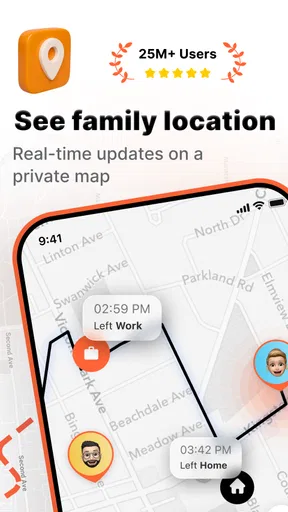
One feature that I found particularly handy is the real-time location tracking. Whether you're waiting for someone to arrive or just want to make sure everyone has reached their destination safely, this feature has got your back. The location updates are accurate and refresh at a reasonable pace.
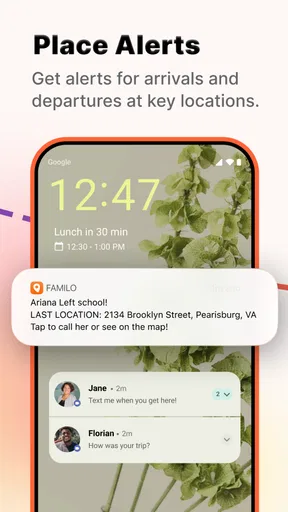
Another neat aspect is the geofencing capability. You can set up safe zones around specific areas, like your home, workplace, or school. You'll receive notifications when someone enters or leaves these zones, providing a sense of security and peace of mind.
Familo also has a built-in messaging feature. It’s super convenient to have all your family communications in one place, especially when planning meetups or checking in during road trips. No more switching between apps to send a quick message!
Making alerts work for real routines
Location updates and safe-zone notifications are most helpful when they answer a question you would otherwise have to ask. For example, a household can use an agreed zone around a regular destination as a simple arrival cue, then use messaging for any exception. I would keep those zones tied to places the group actually cares about; too many alerts can turn a useful signal into background noise.
There is a practical trade-off here. A geofence can tell you that a device crossed an area boundary, but that does not explain why someone is late, whether plans changed, or whether the person carrying the phone is the person expected. I treat the notification as a prompt to coordinate, not as a complete account of what is happening.
Why You Might Love It
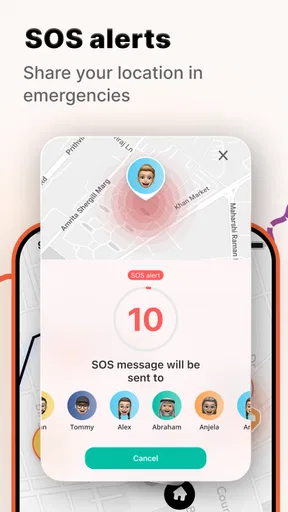
What really sets Familo apart is its focus on family safety. The app allows you to send SOS alerts with your location to your family members in case of emergencies. This feature alone is a game-changer, especially for families with kids or elderly members.
The app is also designed to be battery-friendly. I was initially worried that constant location tracking would drain my phone's battery life, but Familo manages to keep consumption at a minimum. This is a huge plus for someone like me who's always on the go and can’t afford to have a dead phone halfway through the day.
Age, trust, and the limits of a map
Because the app is rated Teen, I would still make the decision about using it with a younger person based on maturity and family expectations, not on the age label alone. A teenager should know who is in the circle, what the location sharing is meant to help with, and how to raise a concern about it. For younger children or older relatives who need support, an adult may need to help with setup and explain what an alert means.
An SOS option can be reassuring, but it is not a substitute for emergency services or a guarantee that a family member will see an alert immediately. I would make sure everyone knows whom to contact in an urgent situation and agree on a backup plan for times when a phone is out of reach, offline, or low on power. The app is best treated as one part of a household’s communication routine.
A Few Things to Keep in Mind
While Familo is fantastic, there are a few things to be aware of. Privacy is always a concern with location-tracking apps. However, Familo emphasizes user control—you can choose when to share your location and with whom. Transparency is key, and the app seems to respect that.
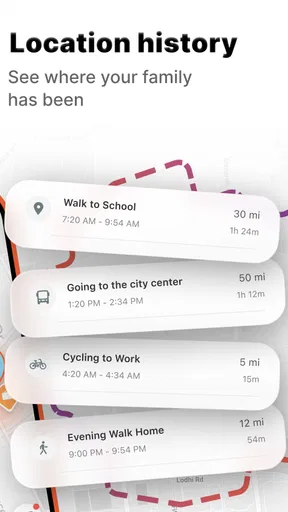
Another point is that some features require a premium subscription. While the basic functionalities are free, things like unlimited location history or more advanced geofencing options come with a cost. It's something to consider if you want to fully utilize the app’s capabilities.
Choosing it over familiar alternatives
Compared with a regular group chat, a shared locator can save time when the question is simply whether someone has reached a place. A chat remains better for context, a detailed change of plan, or a conversation that does not need location sharing. Familo’s appeal is having location, alerts, and family messages together; if your household only needs occasional check-ins, a messaging app and a phone’s built-in location tools may be enough.
I would also think about how much history and alert control the household genuinely needs before paying for extras. If the free functions already cover occasional coordination, there is no reason to upgrade just because more options exist. If a particular paid feature matters to your routine, check its terms in the app before committing, and make sure the people in the circle want that arrangement too.
Who will get the most from it?
Familo is a stronger fit for families who have recurring coordination needs and are comfortable with mutual location sharing: parents arranging pickups, relatives meeting during a trip, or a household that wants a straightforward arrival check. It can also help people who often misplace their phone, although the family-locator framing is most valuable when more than one person participates willingly.
I would skip it if you want covert tracking, if household members are not comfortable sharing location, or if you need a professional dispatch or emergency-response service. It is also unnecessary friction for a group that already communicates clearly and rarely needs to know where anyone is. Installing a locator should solve a real coordination problem, not create a new expectation that everyone must be constantly available.
Final Thoughts
All in all, Familo: Find My Phone Locator is a fantastic tool for families looking to enhance their safety and communication. The app is user-friendly, efficient, and offers a range of features that cater to both practical needs and peace of mind.
Whether you're a parent wanting to keep an eye on your little ones or someone prone to losing their phone in the couch cushions, Familo has something for you. It's more than just a locator; it's a way to stay connected and ensure the safety of those you care about most.
So, why not give it a whirl? Head over to your app store, download Familo, and start experiencing the convenience and security it brings. Trust me, you won’t look back!
My household verdict
Familo is a free lifestyle app from SAFETIX LTD, with optional in-app purchases ranging from $2.99 to $89.99 per item. It has an average rating of 4.3 from around 435,000 ratings, and over 10 million installs. It was released in 2013; version 2.109.9 supports Android 6.0 and later. Those figures suggest it has attracted a large audience, though what matters more to me is whether a household can agree on a sensible, limited purpose for using it.
My recommendation is to try it as a shared coordination tool, not as a substitute for trust or conversation. Start with a small circle, establish what location sharing is for, and use alerts as helpful prompts rather than proof of someone’s intentions. If that approach fits your family, the combination of location, safe zones, messaging, and SOS alerts can make everyday logistics feel less scattered. If the household does not want that level of sharing, a group chat or occasional direct check-in is the better choice.
Verdict
Strengths of Familo: Find My Phone Locator
- Real-time location updates.
- Battery level monitoring feature.
- Family chat integration.
- Easy setup and user-friendly.
- Cross-platform compatibility.
Limitations of Familo: Find My Phone Locator
- Limited features in free version.
- Requires stable internet connection.
- Potential privacy concerns.
- High battery usage reported.
- Occasional GPS inaccuracies.
Similar Picks in This Category
View All
SmartThings
Samsung Electronics Co., Ltd.4.6

Google Home
Google LLC4.0

Pinterest4.2

Astrotalk - Talk to Astrologer
Astrology & Horoscope4.7

My Verizon
Verizon Consumer Group4.5

Samsung Wallet (Samsung Pay)
Samsung Electronics Co., Ltd.4.1
Frequently Asked Questions
What features does Familo offer for family tracking?
Familo provides real-time location sharing, allowing family members to see each other's whereabouts on a private map. It also offers geofencing alerts, so you get notified when someone arrives or leaves a designated area. Additionally, the app includes a built-in chat function and an SOS button for emergencies, ensuring comprehensive family safety.
Is Familo secure and private?
Yes, Familo prioritizes user privacy and security. It uses end-to-end encryption to protect location data and communications. The app allows users to control who can see their location, ensuring only approved family members have access. Familo does not share or sell your data to third parties, maintaining your privacy.
How accurate is the location tracking in Familo?
Familo uses GPS, Wi-Fi, and cellular networks to provide accurate location tracking. While it is generally reliable, accuracy can vary based on environmental factors like signal strength and location settings. For optimal performance, ensure your device's location services are enabled and up-to-date.
Does Familo consume a lot of battery or data?
Familo is designed to be efficient, but it does use GPS and data, which may impact battery life and data usage. The app includes features to minimize consumption, such as adjustable update frequency and power-saving modes. It's advisable to monitor usage and adjust settings according to your needs.
Is Familo free to use, or are there any costs involved?
Familo offers a free version with basic features, which is sufficient for many users. However, premium features, such as extended location history and priority support, require a subscription. Pricing varies, and it's best to check the app store for current rates and options before downloading.
